# Risk Management
The purpose of this document is to provide an overview of Voltage's built-in solution for managing Lightning risk. Additionally, it will guide you on how to integrate your own compliance partners and access your transaction data directly.
## Our Solution
- Amboss Reflex: [https://amboss.tech/reflex](https://amboss.tech/reflex)
### How it works:
Reflex conducts three primary validations—Invoice, Node Pubkey, and Lightning Address. The sections below detail the specific checks performed for each.
### *Invoice Input Evaluation Process*
When an **invoice** is submitted, the system performs a structured sequence of data checks. Each step ensures that the payment details meet compliance requirements and internal risk controls.
### Step 1: Extract the Destination Pubkey
- **1.1 Source of Funds Check**
- The pubkey is screened against the **OFAC Sanctions List**, known **ransomware addresses**, and any **custom address lists** configured in the system.
- **1.2 IP Address Check**
- The destination pubkey IP is verified against **OFAC country restrictions** and any **custom country lists**.
- **1.3 Associated Pubkey Check**
- The destination pubkey is cross-checked with any additional pubkey-specific rules or policies configured by the operator.
### Step 2: Evaluate the Route Hint Pubkey
If the invoice includes route hints, each hint undergoes the same set of validations:
- **2.1 Source of Funds Check**
- Screened against OFAC, ransomware, and custom address lists.
- **2.2 IP Address Check**
- Verified against OFAC country restrictions and any custom country list.
- **2.3 Associated Pubkey Check**
- Any configured pubkey-specific checks are applied.
### Step 3: Verify the Invoice Amount
- The payment amount is compared against a **$10,000 standard threshold**.
- If a **custom threshold** is defined by the operator, that value is used instead.
### *Node Pubkey Input Evaluation Process*
When a **node pubkey** is provided as input, the system evaluates it by deriving related data and applying layered compliance and risk checks. The process follows this sequence:
### Step 1: Derive Peer Pubkeys
- For each peer connected to the input pubkey, the system retrieves associated **addresses**:
- **Tor Addresses**
- Collected but not subject to sanctions or country list checks.
- **IP Clearnet Addresses**
- Each address is screened against the **OFAC Sanctions List** and any configured **custom country list**.
### Step 2: Derive Channel IDs
- From the node pubkey, the system gathers all **channel IDs**.
- Each channel ID is used to identify related **onchain addresses**.
### Step 3: Validate Onchain Addresses
- For every onchain address linked to a channel ID:
- **Source of Funds Check**
- The address is screened against the **OFAC Sanctions List**, known **ransomware addresses**, and any **custom address lists** defined by the operator.
### Step 4: Determine Result
- After all checks, the system outputs one of the following results:
- **Pass** – All checks were completed with no issues.
- **Fail** – One or more checks identified a compliance or policy violation.
- **Skipped** – The check was not applicable to this input type.
- **Error** – The check could not be completed due to a system or data error.
### *Lightning Address Input Evaluation Process*
When a **Lightning Address** is submitted, the system resolves and validates the underlying details. The evaluation process includes the following steps:
### Step 1: Resolve Lightning Address
- The system parses the Lightning Address to confirm it is properly formatted and valid.
### Step 2: Derive Server IP Address
- The server hosting the Lightning Address is identified by its **IP address**.
- This IP is subject to compliance and risk screening (e.g., against OFAC or custom country lists if configured).
### Step 3: Retrieve Invoice Data
- Once the Lightning Address is resolved, the system requests an **invoice** and performs further checks:
- **Destination Pubkey**
- Any **associated pubkeys** are identified and validated according to configured pubkey checks.
- **Route Hint Pubkey**
- Any **associated pubkeys** are also derived and validated according to the same checks.
### Step 4: Determine Result
- Based on the outcomes of all validations, the system assigns one of four results:
- **Pass** – All checks were completed successfully.
- **Fail** – One or more checks identified a compliance or policy violation.
- **Skipped** – The check did not apply to this input type.
- **Error** – The evaluation could not be completed due to a system or data error.
## Other Lightning Risk Management solutions
- Chainalysis: [https://www.chainalysis.com/platform/](https://www.chainalysis.com/platform/)
- Notabene: [https://notabene.id/](https://notabene.id/)
## Accessing Payment Data through the UI
Each wallet shows its own payment activity in **All Payments** and **Payment Requests**. Review the direction, type, description, current status, amount, and last-updated time before taking an operational action.
Use **Filters** to narrow results by date, payment ID, checkout session ID, status, payment type, or direction. Use **Reports** when you need an exportable Payment History or Wallet Balance Snapshot for a selected date range.
A review screen is a pre-submission control; a completed history row is evidence of terminal product state. Continue to reconcile terminal state through the Payments API and webhooks for automated workflows.
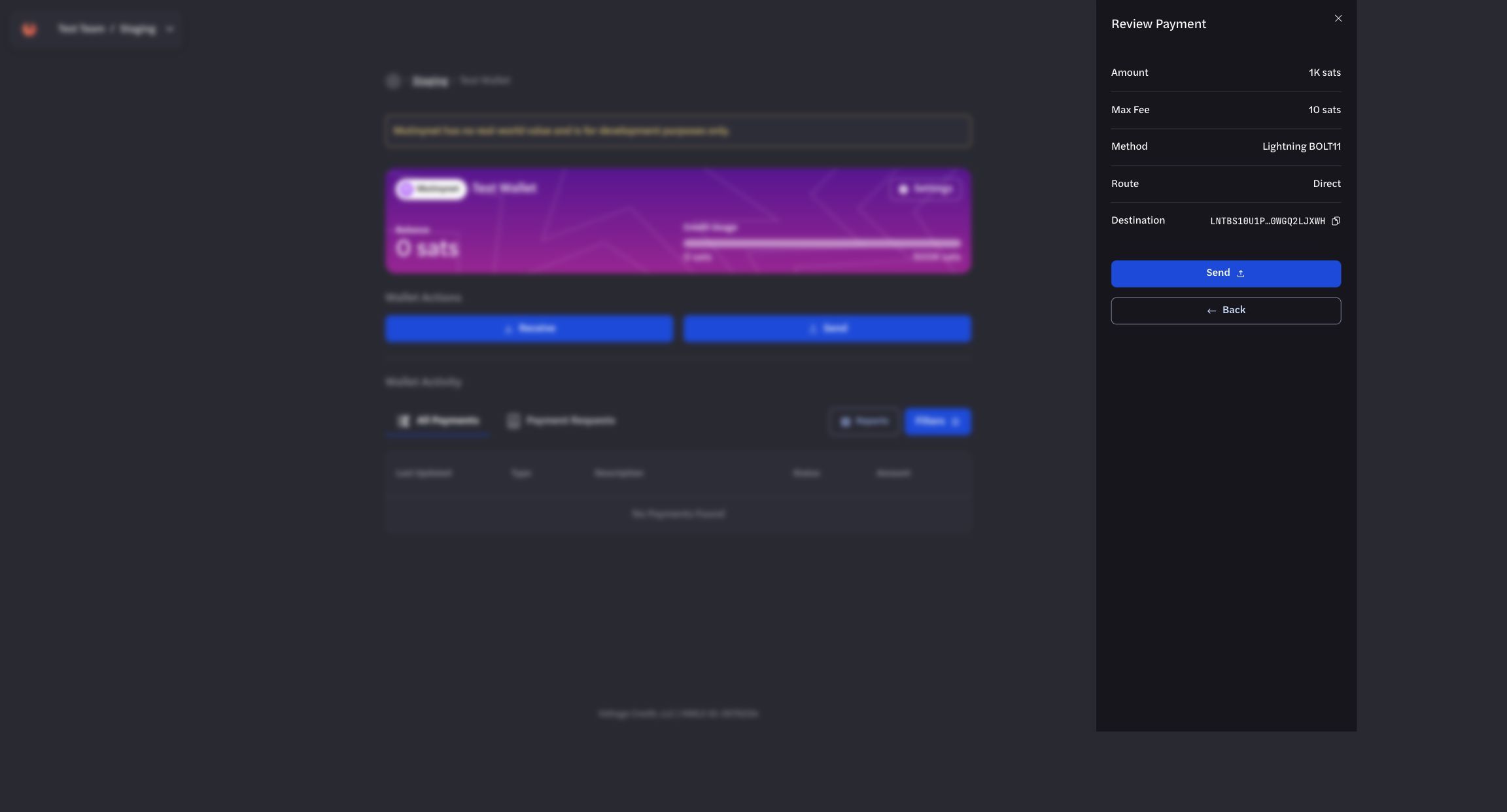
*Use the review step to verify payment details before submission.*
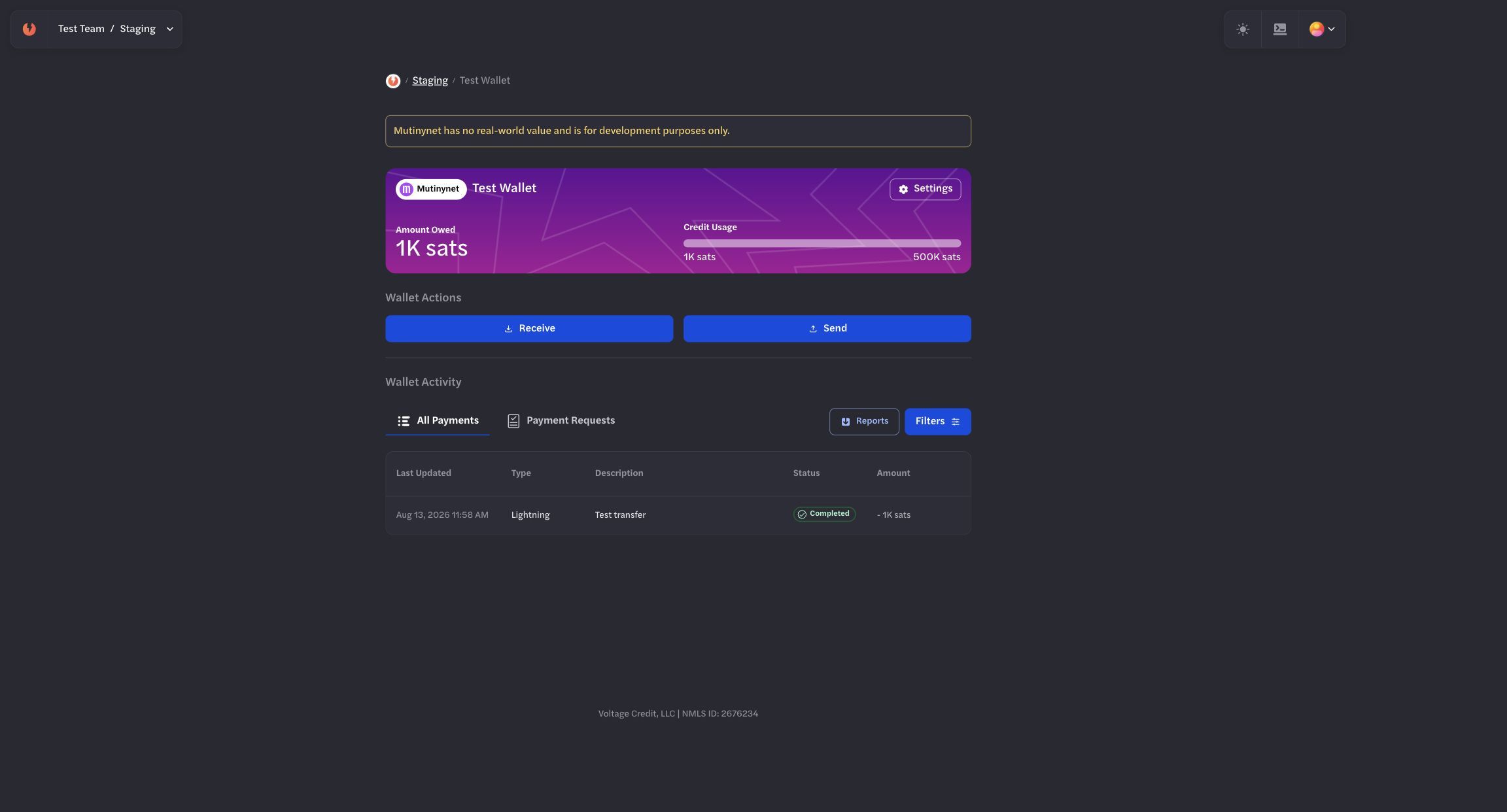
*Confirm the terminal outgoing state in the sending wallet.*
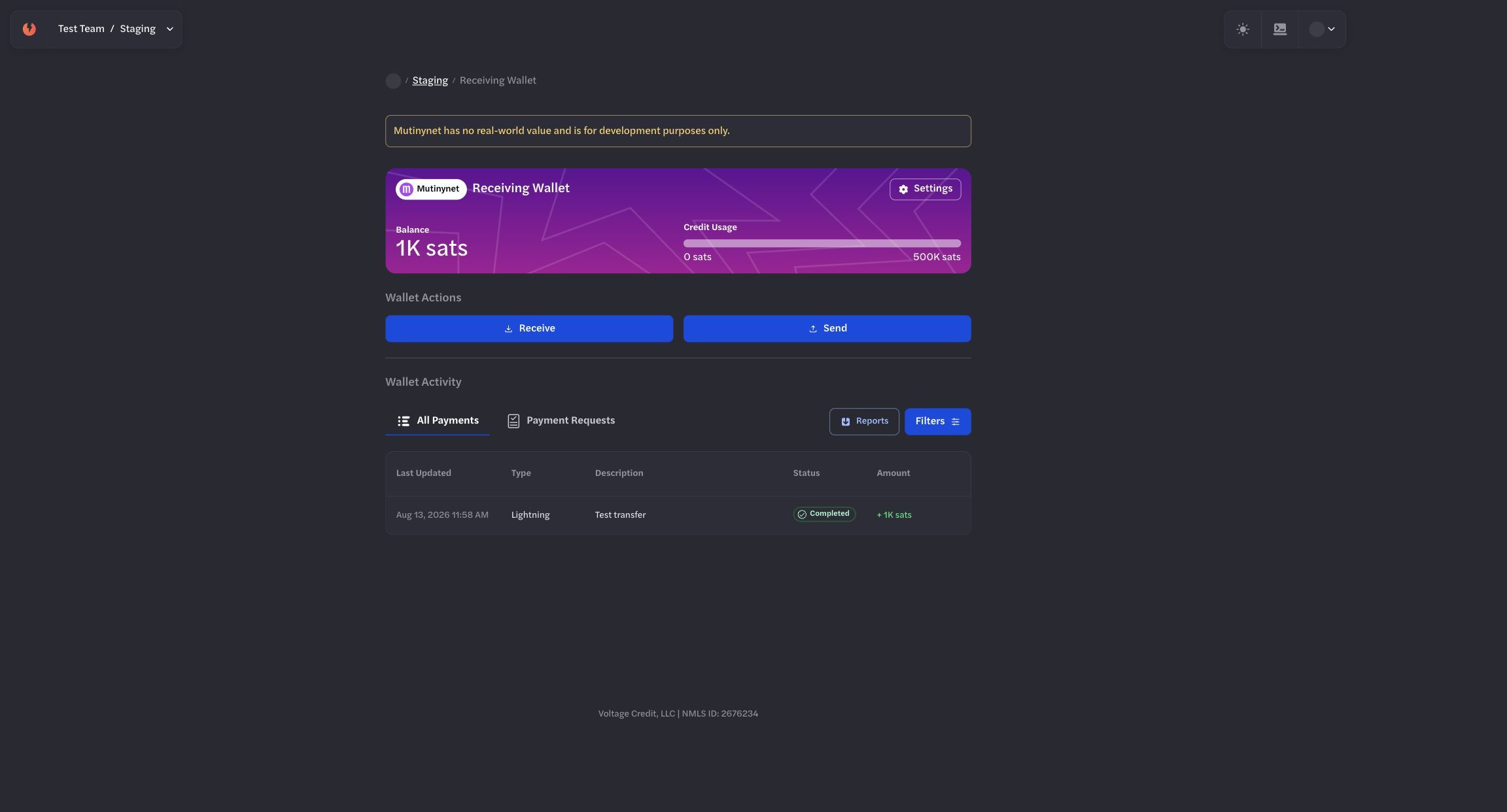
*Cross-check the corresponding incoming state in the receiving wallet.*
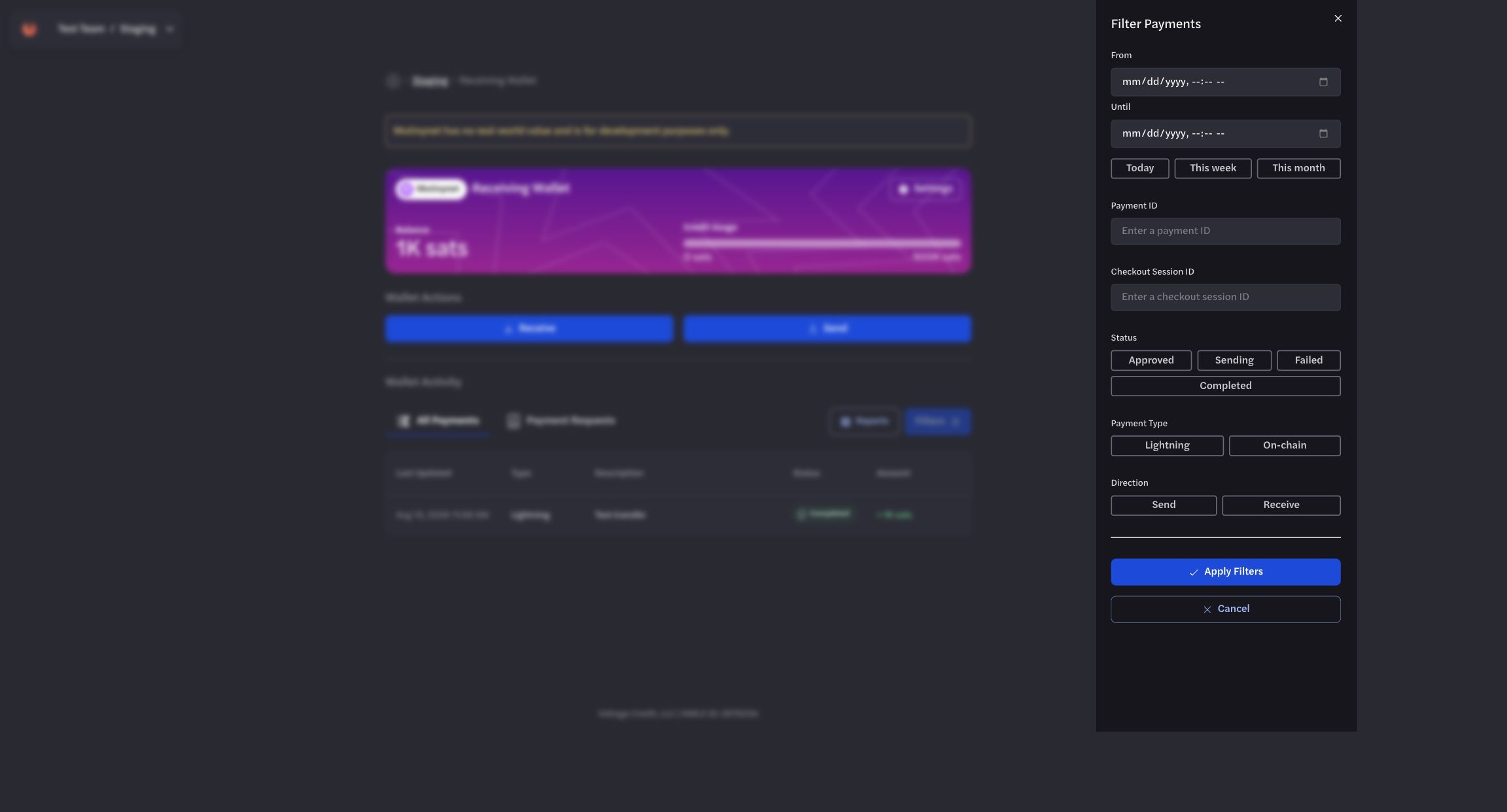
*Use filters to isolate the payment records relevant to an investigation.*
## Accessing Transactions Data through the API
### Get All Payments
**Endpoint:** `GET` `/organizations/{organization_id}/environments/{environment_id}/payments`
**Required Headers:**
> x-api-key: YOUR\_API\_KEY
**Query Parameters (all optional):**
- `offset` - Pagination offset (integer)
- `limit` - Number of results (integer)
- `wallet_id` - Filter by specific wallet (UUID)
- `statuses` - Filter by payment status (array)
- `sort_key` - Sort by created\_at or updated\_at
- `sort_order` - ASC or DESC
- `kind` - Payment type: bolt11, onchain, bip21
- `direction` - send or receive
- `start_date` / `end_date` - Date range filter (ISO format)
**Example Request:**
```bash
curl 'https://voltageapi.com/v1/organizations/{org_id}/environments/{env_id}/payments?limit=10&sort_order=DESC' \
--header 'x-api-key: YOUR_API_KEY'
```
**Response Format:**
```json
{
"items": [
{
"id": "payment-uuid",
"status": "completed|sending|receiving|failed",
"type": "bolt11|onchain|bip21",
"direction": "send|receive",
"currency": "btc",
"created_at": "2024-11-21T18:47:04.008Z",
"updated_at": "2024-11-21T18:47:04.008Z",
"wallet_id": "wallet-uuid",
"data": {
// Payment-specific details (varies by type)
},
"error": null
}
],
"total": 4,
"offset": 0,
"limit": 100
}
```
### Get Single Payment Details
**Endpoint:** `GET` `/organizations/{organization_id}/environments/{environment_id}/payments/{payment_id}`
**Example Request:**
```bash
curl 'https://voltageapi.com/v1/organizations/{org_id}/environments/{env_id}/payments/{payment_id}' \
--header 'x-api-key: YOUR_API_KEY'
```
**Response:** Single payment object with same structure as above.
### Get Payment History
**Endpoint:** `GET` `/organizations/{organization_id}/environments/{environment_id}/payments/{payment_id}/history`
**Example Request:**
```bash
curl 'https://voltageapi.com/v1/organizations/{org_id}/environments/{env_id}/payments/{payment_id}/history' \
--header 'x-api-key: YOUR_SECRET_TOKEN'
```
### Data Structure by Payment Type
**Lightning (bolt11):**
```json
"data": {
"amount_msats": 150000,
"max_fee_msats": 1000,
"memo": "testing",
"payment_request": "lntbs1500n1p..."
}
```
**On-chain:**
```json
"data": {
"address": "tb1pzkhtj4ld86g9c...",
"amount_sats": 150000,
"fees_sats": 10,
"max_fee_sats": 1000,
"receipts": [
{
"amount_sats": 10000,
"height_mined_at": 1888021,
"tx_id": "a22ec88f7a84a705..."
}
]
}
```
## Response Codes
- `200` - Success
- `400` - Bad request format
- `403` - No access (requires organization READ access)
- `404` - Payment not found
- `500` - Server error
Example: Chainalysis Integration
### Key Endpoints
1. Transfers:
- POST /v2/users//transfers
- POST /v1/users//transfers/sent
2. Withdrawal Attempts:
- POST /v2/users//withdrawal-attempts
- POST /v1/users//withdrawaladdresses
### Required Request Properties
When registering LN transfers, the following properties must be specified:
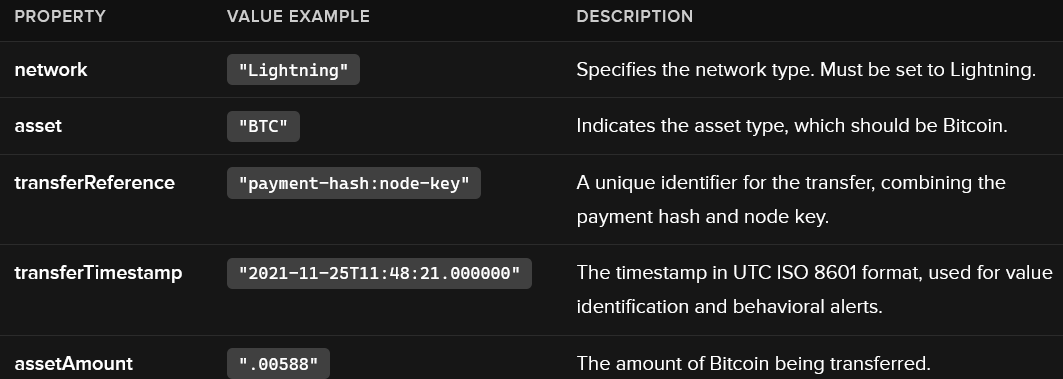
**Additional Notes:**
- **transferReference**: This must be formatted as payment-hash\:node-key. The payment hash can be obtained from the BOLT11 invoice.
- **transferTimestamp**: This is crucial for identifying the USD value of the Bitcoin transferred and generating alerts.
- **assetAmount**: This value must be in Bitcoin.
**Optional Request Properties**
While not required, the following properties can be included without causing errors:
- **outputAddress**: Use the Node Key instead of a standard wallet address.
- **assetPrice** and **assetDenomination**: These can be sent but will not be returned in subsequent GET requests.
**Example cURL Command to register a sent LN transfer using the v2 endpoint:**
```bash
$ curl -X POST 'https://api.chainalysis.com/api/kyt/v2/users/new_user_01/transfers' \
--header 'Token: {YOUR_API_KEY}' \
--header 'Content-type: application/json' \
--data '{
"network": "Lightning",
"asset": "BTC",
"transferReference": "2db4d5579a0e198bd5ce8ffe83ecd0de94acde98cde94125337e2419ebb4cc50:02a0c9089ace681ef4e6ae5310b028d9c2a09187bfbc616da6251e3d08801851b8",
"direction": "sent",
"transferTimestamp": "2021-11-25T11:48:21.000000",
"assetAmount": ".00588"
}'
```
To register the same transfer using the v1 endpoint:
```bash
$ curl -X POST 'https://api.chainalysis.com/api/kyt/v1/users/new_user_01/transfers/sent' \
--header 'Token: {YOUR_API_KEY}' \
--header 'Content-type: application/json' \
--data-raw '[
{
"network": "Lightning",
"asset": "BTC",
"transferReference": "2db4d5579a0e198bd5ce8ffe83ecd0de94acde98cde94125337e2419ebb4cc50:02a0c9089ace681ef4e6ae5310b028d9c2a09187bfbc616da6251e3d08801851b8",
"transferTimestamp": "2021-11-25T11:48:21.000000",
"assetAmount": ".00588"
}
]'
```