

Developer Guide
Receiving
Receiving Payments
Section titled “Receiving Payments”This guide explains how to receive Lightning, on-chain Bitcoin, and BIP21 unified payments using the Voltage Payments API.
Related Guides
Section titled “Related Guides”For detailed guides specific to your wallet type:
- Receiving (USD Line of Credit) – For USD wallets (requires quotes)
- Receiving (BTC Line of Credit) – For BTC wallets (no quotes needed)
Dashboard cross-check
Section titled “Dashboard cross-check”For the BTC workflow on this page, choose Mutinynet Bitcoin. If you are testing the USD line-of-credit workflow, use Mutinynet USD and follow Receiving (USD Line of Credit). Voltage Cash is the experimental stablecoin test wallet and is not used for either BTC or USD line-of-credit testing.
In the selected Development wallet, select Receive, enter a test amount and optional memo, and select Create Payment Request. Use the generated request only in an appropriate test workflow.
A generated or pending request is not proof of payment. Confirm the incoming terminal state in All Payments, then reconcile that state through the Payments API or webhooks for automated workflows.
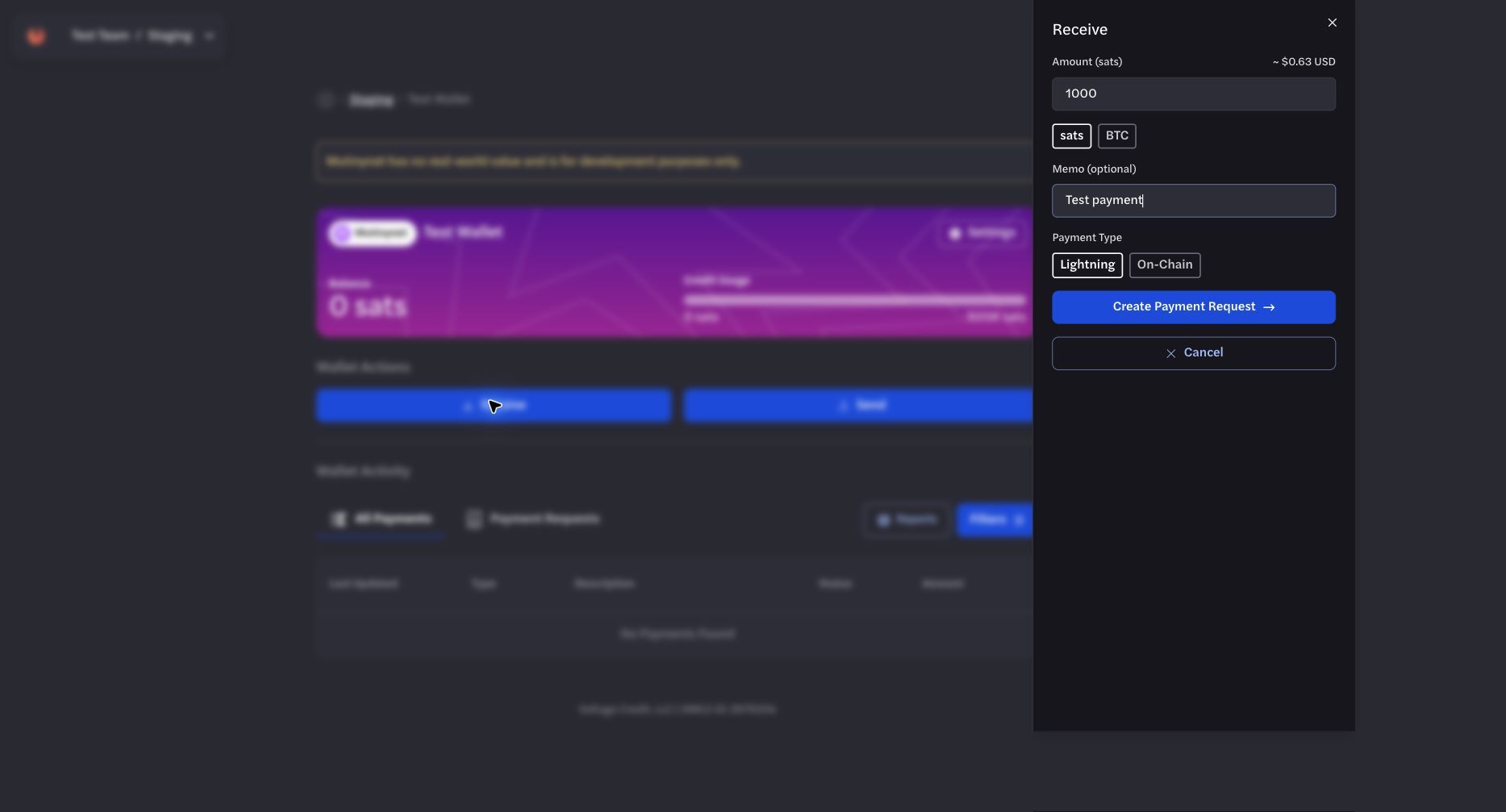
Create a payment request only within an appropriate test workflow.
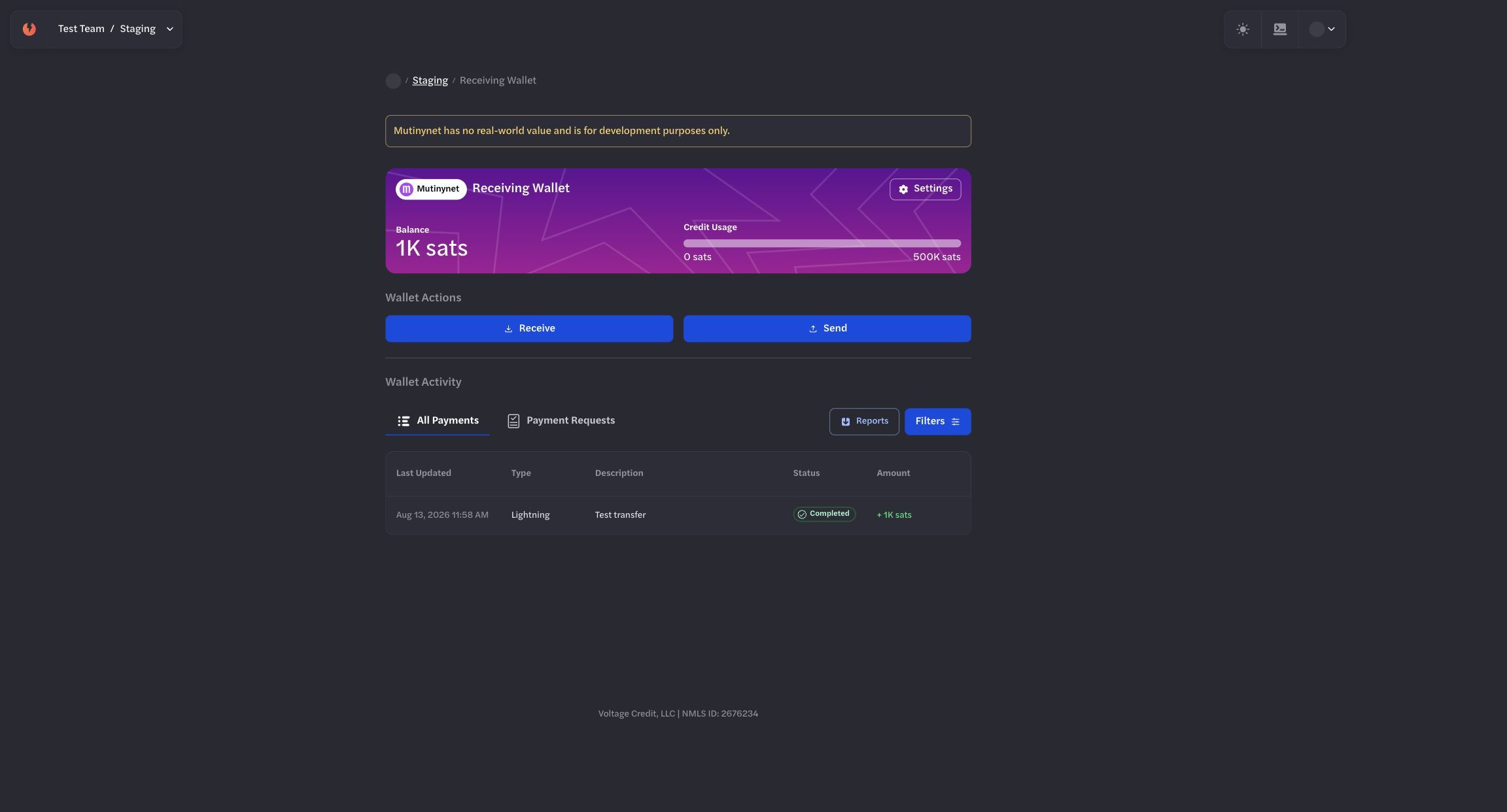
Confirm the incoming terminal state in the receiving wallet and through the API or webhooks.
Prerequisites
Section titled “Prerequisites”- A Voltage account with at least one wallet in the target environment
- An environment API key (x-api-key) from your dashboard
- For USD wallets (receiving BTC → USD), a Line of Credit and access to the Quotes API
High‑Level Flow
Section titled “High‑Level Flow”Receiving a payment is still a two‑step process:
- Create a receive payment request (invoice / address / URI)
- Retrieve the payment to get the invoice details and monitor status
All of this happens via the Payments endpoints:
- POST
/organizations/{organization_id}/environments/{environment_id}/payments– create send or receive payments - GET
/organizations/{organization_id}/environments/{environment_id}/payments/{payment_id}– get a single payment - GET
/organizations/{organization_id}/environments/{environment_id}/payments– list payments (filter for direction=receive) - GET
/organizations/{organization_id}/environments/{environment_id}/payments/{payment_id}/history– timeline of status changes
Key Data Shapes
Section titled “Key Data Shapes”Amount
Section titled “Amount”Supported patterns:
- BTC: smallest unit is millisatoshis
- USD: smallest unit is cents
- Assets: smallest unit is base units
Legacy fields amount_msats and amount_sats are still accepted but deprecated. Prefer the amount object.
Payment kinds (receive)
Section titled “Payment kinds (receive)”When creating a receive payment, you set:
bolt11– Lightning invoiceonchain– On-chain Bitcoin addressbip21– Unified BIP21 URI (on-chain + optional LN)taprootasset– Taproot Asset invoice
Receive statuses
Section titled “Receive statuses”For incoming payments, the status field uses:
generating– invoice/address is being createdreceiving– invoice/address created and waiting for paymentcompleted– fully received and creditedexpired– invoice expired before being paidfailed– could not be generated or completed
Step 1 – Create a Receive Payment
Section titled “Step 1 – Create a Receive Payment”Endpoint
Section titled “Endpoint”POSThttps://voltageapi.com/v1/organizations/{organization_id}/environments/{environment_id}/paymentsThe same endpoint creates send and receive payments. A successful request returns 202 Accepted with an empty body; poll the payment by the id you submitted.
Headers
Section titled “Headers”x-api-key: your-api-keyContent-Type: application/json1.1 Receive a fixed‑amount Lightning (BOLT11) payment – BTC wallet
Section titled “1.1 Receive a fixed‑amount Lightning (BOLT11) payment – BTC wallet”Use the “Receive Payment with Specific Amount” shape:
{ "id": "9c3f1a80-4d7e-4a52-9f21-8a6b0c5d3e14", "wallet_id": "7a68a525-9d11-4c1e-a3dd-1c2bf1378ba2", "payment_kind": "bolt11", "amount": { "currency": "btc", "amount": 150000, "unit": "msats" }, "description": "Order 123", "expiration": 3600}For USD wallets, also include a quote_id.
Required Fields
Section titled “Required Fields”Note: The description field in your request appears as memo in the response.
Required fields (fixed‑amount receive):
id– your unique idempotent ID (UUID recommended)wallet_id– wallet that will receive fundscurrency– “btc” (must match the wallet’s currency)payment_kind– “bolt11” | “onchain” | “bip21” | “taprootasset”amount– Amount object for the requested amount
Optional:
description– memo / descriptionexpiration– invoice expiry in seconds (defaults to 3600; max 86400 for LN / BIP21)
1.2 Receive a Lightning invoice with any amount (BTC wallet only)
Section titled “1.2 Receive a Lightning invoice with any amount (BTC wallet only)”For “pay any amount” invoices, use the “Receive Payment with Any Amount” shape:
{ "id": "b7d2e4f1-3c8a-4b96-8e05-1f2a7c9d4b63", "wallet_id": "7a68a525-9d11-4c1e-a3dd-1c2bf1378ba2", "currency": "btc", "payment_kind": "bolt11", "description": "Pay what you want", "expiration": 3600}Notes
- currency must be “btc”
- payment_kind can be “bolt11” or “bip21”
- No amount is included; the payer chooses the amount
1.3 Receive an on‑chain BTC payment
Section titled “1.3 Receive an on‑chain BTC payment”Creates a new on‑chain address and tracks the payment:
{ "id": "4e8c1d35-9a7b-42f0-b6d8-3c5e1a9f7204", "wallet_id": "7a68a525-9d11-4c1e-a3dd-1c2bf1378ba2", "payment_kind": "onchain", "amount": { "currency": "btc", "amount": 150000000, "unit": "msats" }, "description": "Invoice 4821"}The response will include:
- A Bitcoin address in data.address
- data.receipts entries as the transaction confirms
1.4 Receive a BIP21 unified payment (on‑chain + LN)
Section titled “1.4 Receive a BIP21 unified payment (on‑chain + LN)”Creates a BIP21 URI that can embed both an on‑chain address and a Lightning invoice:
{ "id": "6a1b9c47-2e5d-4f83-9107-8b4c2d6e5a39", "wallet_id": "7a68a525-9d11-4c1e-a3dd-1c2bf1378ba2", "payment_kind": "bip21", "amount": { "currency": "btc", "amount": 150000000, "unit": "msats" }, "description": "Payment for services", "expiration": 3600}The resulting data will include:
- payment_request (optional BOLT11)
- address (BTC address)
- receipts for completed on-chain or LN parts
Step 2: Retrieve Payment Details
Section titled “Step 2: Retrieve Payment Details”Endpoint
Section titled “Endpoint”GEThttps://voltageapi.com/v1/organizations/{organization_id}/environments/{environment_id}/payments/{payment_id}Headers
Section titled “Headers”x-api-key: your-api-keyExample response – BTC Lightning receive
Section titled “Example response – BTC Lightning receive”{ "bip21_uri": "lightning:lntbs1500n1pn5w25ypp59sfhx5llskdp6rmsmmq3zs86xey6l4y9wkzvkjl5v2cw0ex7xd4sdqqcqzzsxqyz5vqsp5u333jtc7lh0qvkusq5ntcpm3n2jjx6tw8jz7zvpqpnt3v8e572eq9qxpqysgq4hm7n79tnk76j4ll4f7ey9mmxdyj5pwzcmyqgxtgz40vjg9w58wq73040qvuurj83jakt2zws6y9qgzg2f6gtnj3ajf0mj4gw4mdt2cqhr2tpz", "created_at": "2025-02-12T21:21:21.744713Z", "currency": "btc", "data": { "amount": { "amount": 150000, "currency": "btc", "unit": "msats" }, "amount_msats": 150000, "expiration": 3600, "market_quote": null, "memo": "Order 123", "payment_request": "lntbs1500n1pn5w25ypp59sfhx5llskdp6rmsmmq3zs86xey6l4y9wkzvkjl5v2cw0ex7xd4sdqqcqzzsxqyz5vqsp5u333jtc7lh0qvkusq5ntcpm3n2jjx6tw8jz7zvpqpnt3v8e572eq9qxpqysgq4hm7n79tnk76j4ll4f7ey9mmxdyj5pwzcmyqgxtgz40vjg9w58wq73040qvuurj83jakt2zws6y9qgzg2f6gtnj3ajf0mj4gw4mdt2cqhr2tpz", "receipts": [ { "data": { "ledger_id": "03d87c6d-2cf8-414b-929a-eceeb4c896ed", "payment_hash": "2222222222222222222222222222222222222222222222222222222222222222", "preimage": "1111111111111111111111111111111111111111111111111111111111111111" }, "type": "lightning" } ] }, "direction": "receive", "environment_id": "123e4567-e89b-12d3-a456-426614174000", "error": null, "exchanges": [], "frozen": [], "id": "11ca843c-bdaa-44b6-965a-39ac550fcef7", "organization_id": "b0684ab8-1130-46af-8f70-71519442f108", "requested_amount": { "amount": 150000, "currency": "btc", "unit": "msats" }, "status": "completed", "type": "bolt11", "updated_at": "2025-02-12T21:23:03.173159Z", "wallet_id": "7a68a525-9d11-4c1e-a3dd-1c2bf1378ba2"}Key fields for receives:
direction– always “receive” for incoming paymentstype– bolt11 | onchain | bip21 | taprootassetdata.payment_request/ data.address / data.receipts depending on typerequested_amount– what you originally requestedstatus– current receive state (generating, receiving, expired, failed, completed)error– structured error info if something failedfrozen– parts of the payment frozen for compliance (e.g., OFAC)exchanges– currency exchange details when quotes/markets are involved
Listing Incoming Payments
Section titled “Listing Incoming Payments”You can list and filter payments, including only receive‑direction ones.
Endpoint
Section titled “Endpoint”GEThttps://voltageapi.com/v1/organizations/{organization_id}/environments/{environment_id}/paymentsUseful query params
Section titled “Useful query params”direction=receive– only incoming paymentswallet_id={wallet_id}– specific walletstatuses[]=receiving&statuses[]=completed– filter by status- Pagination:
offset,limit
Example
Section titled “Example”curl 'https://voltageapi.com/v1/organizations/{organization_id}/environments/{environment_id}/payments?direction=receive&limit=25' \ --header 'x-api-key: your-api-key'Viewing Payment History
Section titled “Viewing Payment History”To see the lifecycle of a receive payment:
GEThttps://voltageapi.com/v1/organizations/{organization_id}/environments/{environment_id}/payments/{payment_id}/historyExample response contains ordered events with timestamps and errors (if any), which is helpful for debugging or audits.
Monitoring Receive Status
Section titled “Monitoring Receive Status”Typical state transitions for incoming payments:
generating→ payment being set up (invoice/address generation)receiving→ invoice/address generated, waiting for fundscompleted→ funds received and creditedexpired→ invoice expired before paymentfailed→ an error occurred (see error field for details)
You can monitor:
- By polling
GET /payments/{payment_id}untilstatusis terminal (completed,expired, orfailed) - And/or by using webhooks (recommended)
Webhooks for Receive Events (Recommended)
Section titled “Webhooks for Receive Events (Recommended)”Create a webhook to get real‑time notifications when receive payments are generated, completed, expired, etc.
Create a webhook
Section titled “Create a webhook”POSThttps://voltageapi.com/v1/organizations/{organization_id}/environments/{environment_id}/webhooksNewWebhookRequest includes:
id– a client-generated UUID for the webhook registration; the create response returns this same valueurl– your HTTPS endpointname– webhook nameevents– an array of event type objects; each object contains exactly one event:
[ { "receive": "generated" }, { "receive": "completed" }, { "receive": "expired" }, { "receive": "failed" }]The create response also returns a one-time shared_secret. Store it for signature verification; it is not included in callbacks. In a receive callback, detail.data.id is the payment ID supplied when the payment was created, not the webhook ID or organization ID. See Webhooks for the complete payload and identifier map.
You can test webhooks with:
POSThttps://voltageapi.com/v1/organizations/{organization_id}/environments/{environment_id}/webhooks/{webhook_id}/testReceive webhook payloads include:
type: “receive”detail.data– full Payment objectdetail.event– receive event type (generated,refreshed,expired,succeeded,completed,failed)
Processing Fees
Section titled “Processing Fees”Your organization can charge an optional percentage processing fee on payments. Processing fees are off by default and are configured per wallet. See Processing Fees for how to view and set your rates.
On a receive, the processing fee is included in the payer-facing amount on the generated invoice, address, or BIP21 URI. The payer funds it, and it sits outside the amount credited to your wallet.
When a rate is configured, receive payment responses include a processing_fee object and a payment_breakdown:
{ "processing_fee": { "basis_points": 250, "amount": { "currency": "btc", "amount": 3750, "unit": "msats" } }, "payment_breakdown": { "principal": { "currency": "btc", "amount": 150000, "unit": "msats" }, "network_fee": { "currency": "btc", "amount": 0, "unit": "msats" }, "processing_fee": { "currency": "btc", "amount": 3750, "unit": "msats" } }}processing_fee.basis_points– the configured rate applied to this payment.100is 1%,250is 2.5%.processing_fee.amount– the fee calculated for this payment, in the principal’s assessment currency. It is available before settlement and stays stable across partial or excess payments.data.fees– the processing fee assessed for this receive, when configured.payment_breakdown.processing_fee– the authoritative settled fee. Use this for reconciliation.
Both fields are omitted when no processing fee applies, so this does not affect integrations that have no rate configured.
Error Handling
Section titled “Error Handling”Common HTTP responses from Payments endpoints:
202– receive payment creation accepted (invoice/address generation started)200– successful retrieval / list / history400– invalid request (bad IDs, missing fields, invalid quote for USD, etc.)403– authentication/authorization error404– payment not found in this organization + environment500– server error
Within the payment object:
- Receive errors (in error) include:
receive_failedexpiredrejected
- For USD conversions,
data.market_quote+exchangeshelp you understand which rate was used.