

Security
Risk Management
The purpose of this document is to provide an overview of Voltage’s built-in solution for managing Lightning risk. Additionally, it will guide you on how to integrate your own compliance partners and access your transaction data directly.
Our Solution
Section titled “Our Solution”- Amboss Reflex: https://amboss.tech/reflex
How it works:
Section titled “How it works:”Reflex conducts three primary validations—Invoice, Node Pubkey, and Lightning Address. The sections below detail the specific checks performed for each.
Invoice Input Evaluation Process
Section titled “Invoice Input Evaluation Process”When an invoice is submitted, the system performs a structured sequence of data checks. Each step ensures that the payment details meet compliance requirements and internal risk controls.
Step 1: Extract the Destination Pubkey
Section titled “Step 1: Extract the Destination Pubkey”- 1.1 Source of Funds Check
- The pubkey is screened against the OFAC Sanctions List, known ransomware addresses, and any custom address lists configured in the system.
- 1.2 IP Address Check
- The destination pubkey IP is verified against OFAC country restrictions and any custom country lists.
- 1.3 Associated Pubkey Check
- The destination pubkey is cross-checked with any additional pubkey-specific rules or policies configured by the operator.
Step 2: Evaluate the Route Hint Pubkey
Section titled “Step 2: Evaluate the Route Hint Pubkey”If the invoice includes route hints, each hint undergoes the same set of validations:
- 2.1 Source of Funds Check
- Screened against OFAC, ransomware, and custom address lists.
- 2.2 IP Address Check
- Verified against OFAC country restrictions and any custom country list.
- 2.3 Associated Pubkey Check
- Any configured pubkey-specific checks are applied.
Step 3: Verify the Invoice Amount
Section titled “Step 3: Verify the Invoice Amount”- The payment amount is compared against a $10,000 standard threshold.
- If a custom threshold is defined by the operator, that value is used instead.
Node Pubkey Input Evaluation Process
Section titled “Node Pubkey Input Evaluation Process”When a node pubkey is provided as input, the system evaluates it by deriving related data and applying layered compliance and risk checks. The process follows this sequence:
Step 1: Derive Peer Pubkeys
Section titled “Step 1: Derive Peer Pubkeys”- For each peer connected to the input pubkey, the system retrieves associated addresses:
- Tor Addresses
- Collected but not subject to sanctions or country list checks.
- IP Clearnet Addresses
- Each address is screened against the OFAC Sanctions List and any configured custom country list.
- Tor Addresses
Step 2: Derive Channel IDs
Section titled “Step 2: Derive Channel IDs”- From the node pubkey, the system gathers all channel IDs.
- Each channel ID is used to identify related onchain addresses.
Step 3: Validate Onchain Addresses
Section titled “Step 3: Validate Onchain Addresses”- For every onchain address linked to a channel ID:
- Source of Funds Check
- The address is screened against the OFAC Sanctions List, known ransomware addresses, and any custom address lists defined by the operator.
- Source of Funds Check
Step 4: Determine Result
Section titled “Step 4: Determine Result”- After all checks, the system outputs one of the following results:
- Pass – All checks were completed with no issues.
- Fail – One or more checks identified a compliance or policy violation.
- Skipped – The check was not applicable to this input type.
- Error – The check could not be completed due to a system or data error.
Lightning Address Input Evaluation Process
Section titled “Lightning Address Input Evaluation Process”When a Lightning Address is submitted, the system resolves and validates the underlying details. The evaluation process includes the following steps:
Step 1: Resolve Lightning Address
Section titled “Step 1: Resolve Lightning Address”- The system parses the Lightning Address to confirm it is properly formatted and valid.
Step 2: Derive Server IP Address
Section titled “Step 2: Derive Server IP Address”- The server hosting the Lightning Address is identified by its IP address.
- This IP is subject to compliance and risk screening (e.g., against OFAC or custom country lists if configured).
Step 3: Retrieve Invoice Data
Section titled “Step 3: Retrieve Invoice Data”- Once the Lightning Address is resolved, the system requests an invoice and performs further checks:
- Destination Pubkey
- Any associated pubkeys are identified and validated according to configured pubkey checks.
- Route Hint Pubkey
- Any associated pubkeys are also derived and validated according to the same checks.
- Destination Pubkey
Step 4: Determine Result
Section titled “Step 4: Determine Result”- Based on the outcomes of all validations, the system assigns one of four results:
- Pass – All checks were completed successfully.
- Fail – One or more checks identified a compliance or policy violation.
- Skipped – The check did not apply to this input type.
- Error – The evaluation could not be completed due to a system or data error.
Other Lightning Risk Management solutions
Section titled “Other Lightning Risk Management solutions”- Chainalysis: https://www.chainalysis.com/platform/
- Notabene: https://notabene.id/
Accessing Payment Data through the UI
Section titled “Accessing Payment Data through the UI”Each wallet shows its own payment activity in All Payments and Payment Requests. Review the direction, type, description, current status, amount, and last-updated time before taking an operational action.
Use Filters to narrow results by date, payment ID, checkout session ID, status, payment type, or direction. Use Reports when you need an exportable Payment History or Wallet Balance Snapshot for a selected date range.
A review screen is a pre-submission control; a completed history row is evidence of terminal product state. Continue to reconcile terminal state through the Payments API and webhooks for automated workflows.
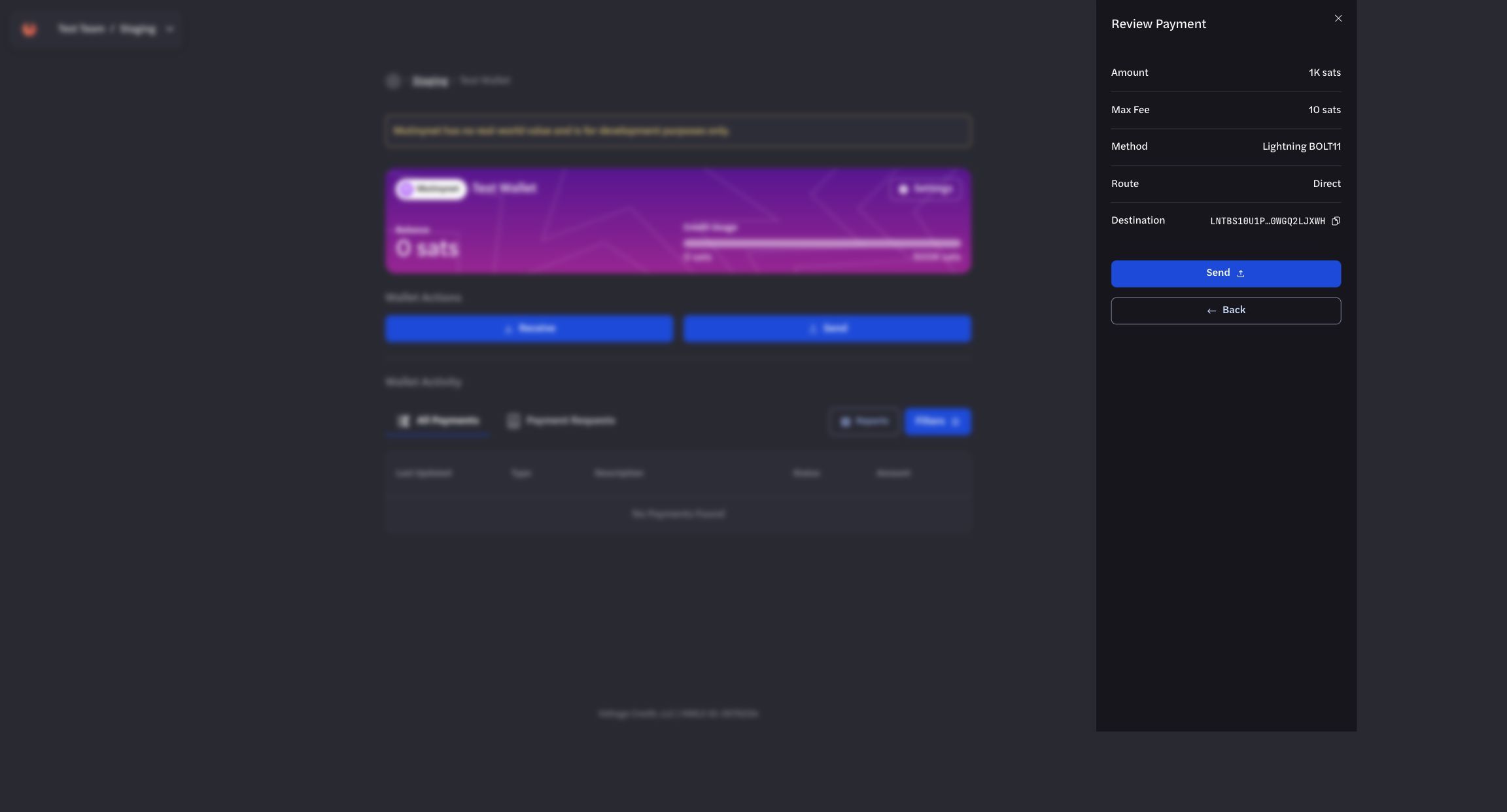
Use the review step to verify payment details before submission.
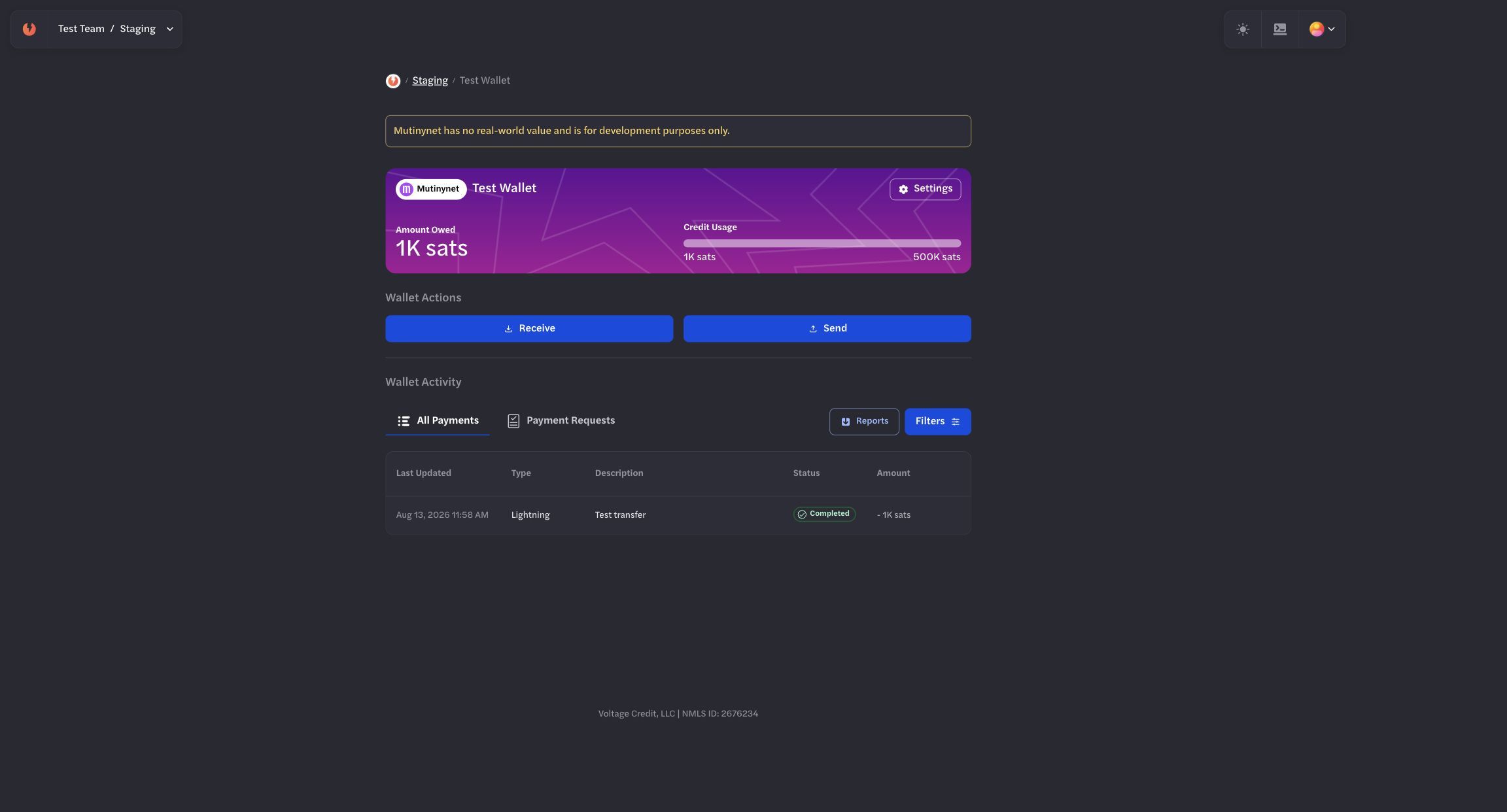
Confirm the terminal outgoing state in the sending wallet.
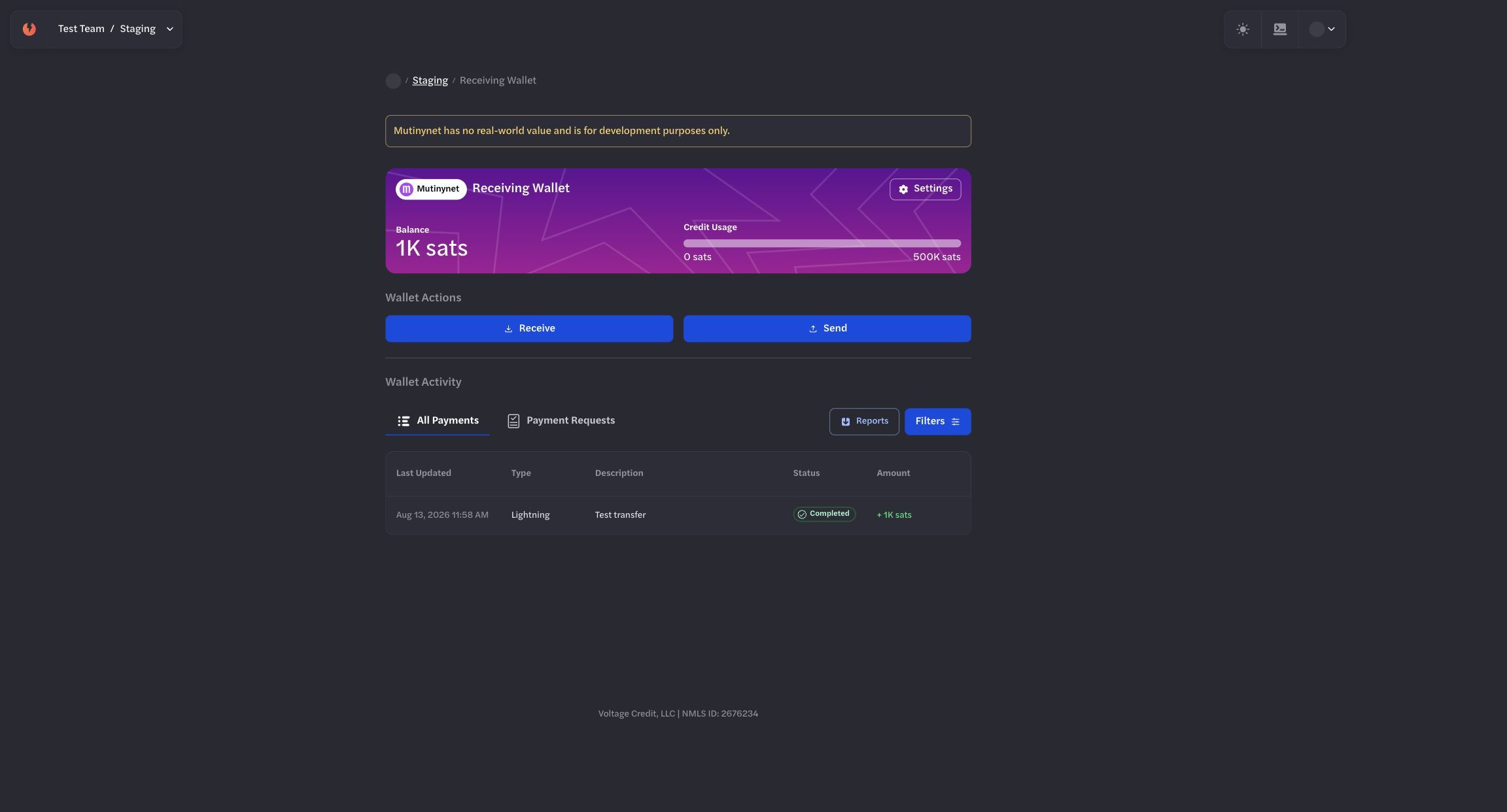
Cross-check the corresponding incoming state in the receiving wallet.
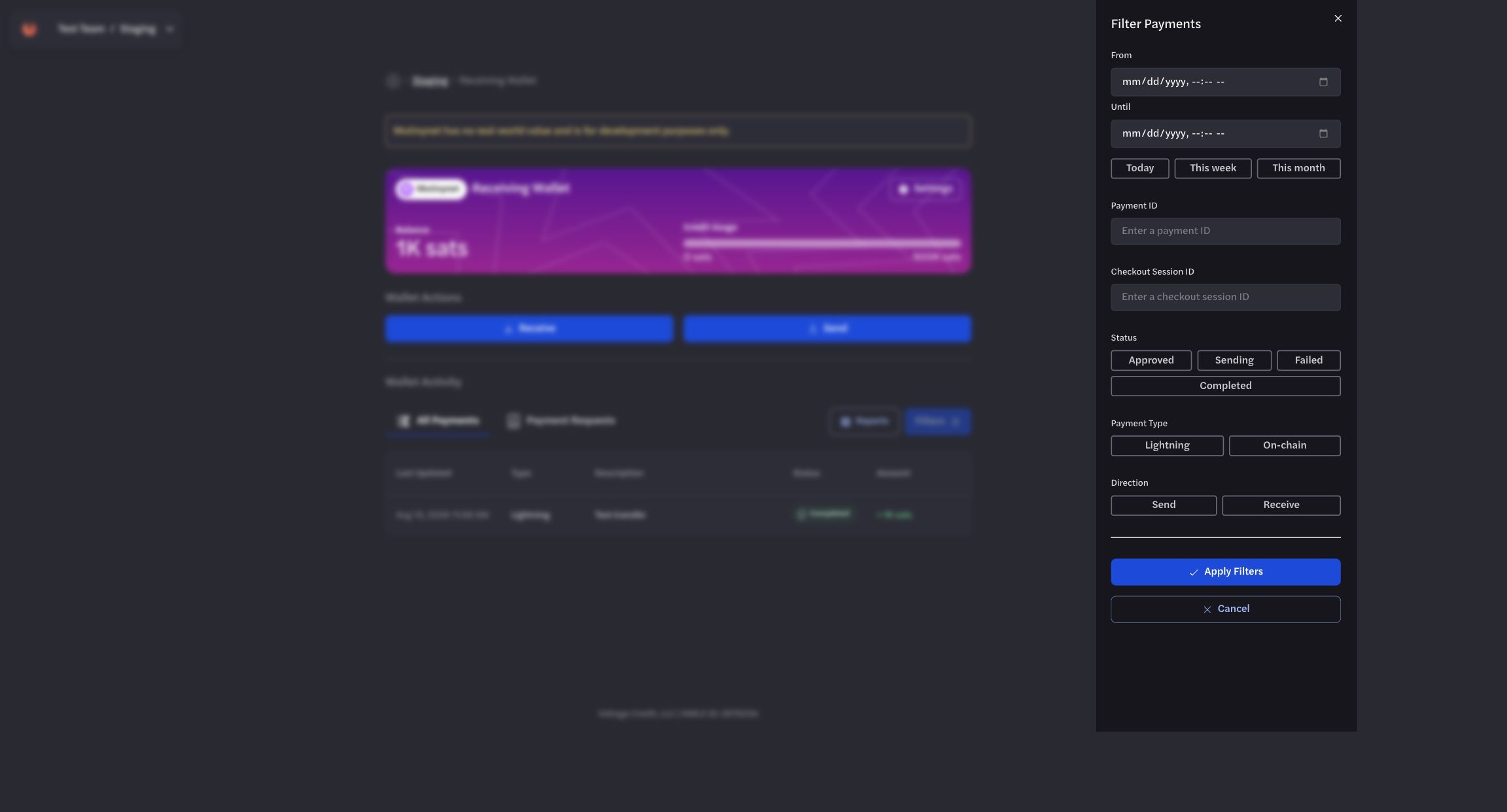
Use filters to isolate the payment records relevant to an investigation.
Accessing Transactions Data through the API
Section titled “Accessing Transactions Data through the API”Get All Payments
Section titled “Get All Payments”Endpoint: GET /organizations/{organization_id}/environments/{environment_id}/payments
Required Headers:
x-api-key: YOUR_API_KEY
Query Parameters (all optional):
offset- Pagination offset (integer)limit- Number of results (integer)wallet_id- Filter by specific wallet (UUID)statuses- Filter by payment status (array)sort_key- Sort by created_at or updated_atsort_order- ASC or DESCkind- Payment type: bolt11, onchain, bip21direction- send or receivestart_date/end_date- Date range filter (ISO format)
Example Request:
curl 'https://voltageapi.com/v1/organizations/{org_id}/environments/{env_id}/payments?limit=10&sort_order=DESC' \ --header 'x-api-key: YOUR_API_KEY'Response Format:
{ "items": [ { "id": "payment-uuid", "status": "completed|sending|receiving|failed", "type": "bolt11|onchain|bip21", "direction": "send|receive", "currency": "btc", "created_at": "2024-11-21T18:47:04.008Z", "updated_at": "2024-11-21T18:47:04.008Z", "wallet_id": "wallet-uuid", "data": { // Payment-specific details (varies by type) }, "error": null } ], "total": 4, "offset": 0, "limit": 100}Get Single Payment Details
Section titled “Get Single Payment Details”Endpoint: GET /organizations/{organization_id}/environments/{environment_id}/payments/{payment_id}
Example Request:
curl 'https://voltageapi.com/v1/organizations/{org_id}/environments/{env_id}/payments/{payment_id}' \ --header 'x-api-key: YOUR_API_KEY'Response: Single payment object with same structure as above.
Get Payment History
Section titled “Get Payment History”Endpoint: GET /organizations/{organization_id}/environments/{environment_id}/payments/{payment_id}/history
Example Request:
curl 'https://voltageapi.com/v1/organizations/{org_id}/environments/{env_id}/payments/{payment_id}/history' \ --header 'x-api-key: YOUR_SECRET_TOKEN'Data Structure by Payment Type
Section titled “Data Structure by Payment Type”Lightning (bolt11):
"data": { "amount_msats": 150000, "max_fee_msats": 1000, "memo": "testing", "payment_request": "lntbs1500n1p..."}On-chain:
"data": { "address": "tb1pzkhtj4ld86g9c...", "amount_sats": 150000, "fees_sats": 10, "max_fee_sats": 1000, "receipts": [ { "amount_sats": 10000, "height_mined_at": 1888021, "tx_id": "a22ec88f7a84a705..." } ]}Response Codes
Section titled “Response Codes”200- Success400- Bad request format403- No access (requires organization READ access)404- Payment not found500- Server error
Example: Chainalysis Integration
Key Endpoints
Section titled “Key Endpoints”- Transfers:
- POST /v2/users//transfers
- POST /v1/users//transfers/sent
- Withdrawal Attempts:
- POST /v2/users//withdrawal-attempts
- POST /v1/users//withdrawaladdresses
Required Request Properties
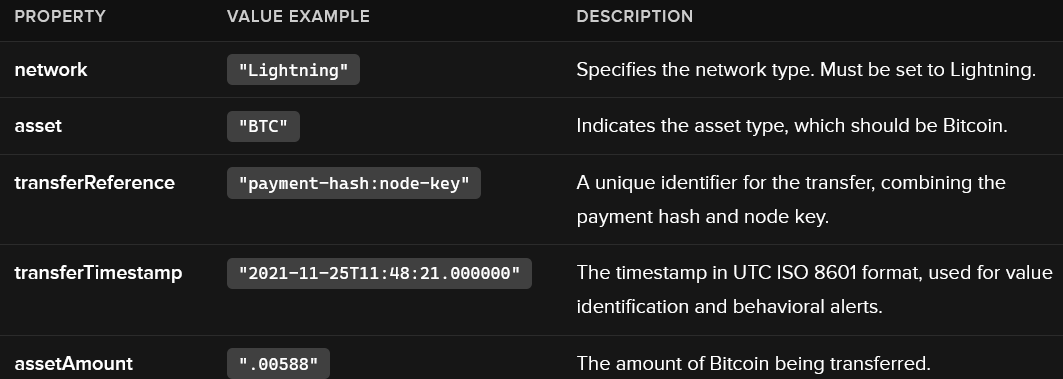
Section titled “Required Request Properties”When registering LN transfers, the following properties must be specified:
Additional Notes:
- transferReference: This must be formatted as payment-hash:node-key. The payment hash can be obtained from the BOLT11 invoice.
- transferTimestamp: This is crucial for identifying the USD value of the Bitcoin transferred and generating alerts.
- assetAmount: This value must be in Bitcoin.
Optional Request Properties
While not required, the following properties can be included without causing errors:
- outputAddress: Use the Node Key instead of a standard wallet address.
- assetPrice and assetDenomination: These can be sent but will not be returned in subsequent GET requests.
Example cURL Command to register a sent LN transfer using the v2 endpoint:
$ curl -X POST 'https://api.chainalysis.com/api/kyt/v2/users/new_user_01/transfers' \ --header 'Token: {YOUR_API_KEY}' \ --header 'Content-type: application/json' \ --data '{ "network": "Lightning", "asset": "BTC", "transferReference": "2db4d5579a0e198bd5ce8ffe83ecd0de94acde98cde94125337e2419ebb4cc50:02a0c9089ace681ef4e6ae5310b028d9c2a09187bfbc616da6251e3d08801851b8", "direction": "sent", "transferTimestamp": "2021-11-25T11:48:21.000000", "assetAmount": ".00588"}'