

Developer Guide
Checkout (Beta)
Voltage Checkout gives merchants a hosted Lightning payment page without requiring them to build and operate the payment interface themselves.
See the Demo
Section titled “See the Demo”If you want to see a demo of what to expect from the checkout, you can view a live example here.
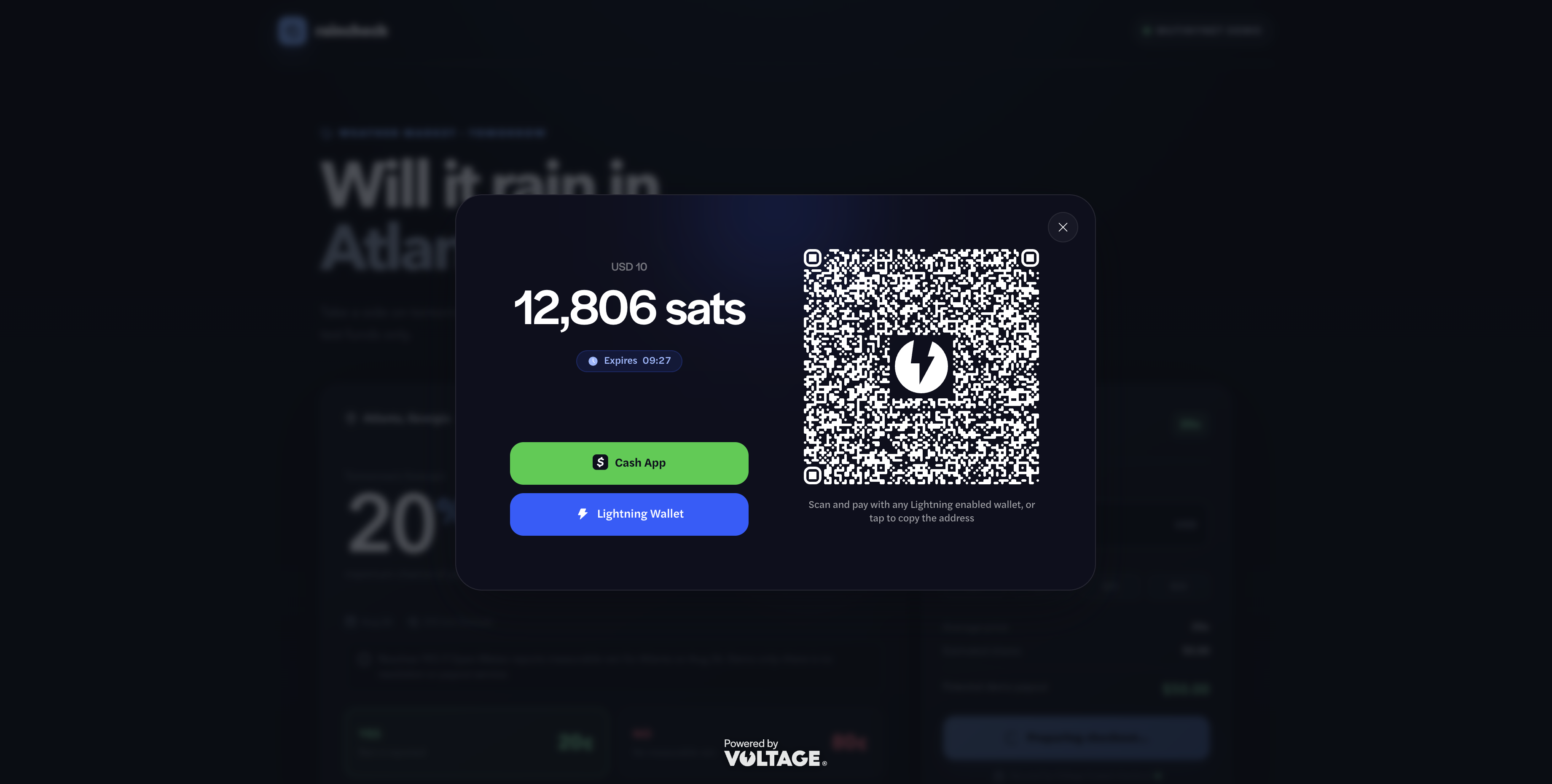
How Checkout works
Section titled “How Checkout works”- Your server creates a checkout session for an order.
- Voltage returns a hosted checkout_url, checkout session ID, and payment ID.
- Your browser opens the returned URL: with the Voltage Checkout JavaScript SDK, as a full-page redirect, or in your own iframe. See Choose how to open Checkout.
- The customer pays the Lightning invoice.
- The hosted page reports status to the browser.
- Your server verifies the payment before fulfilling the order.
The browser experience helps the customer complete payment, but it is not the authoritative payment record. A customer can close a tab, lose network access, or modify browser code, so always verify payment from your server.
Before you integrate
Section titled “Before you integrate”Make sure you have a Voltage wallet that you can use (Mutinynet for testing, or mainnet for real money). You can learn more about those topics in the Wallet Setup Guide or Wallet Management article.
Configure browser origins
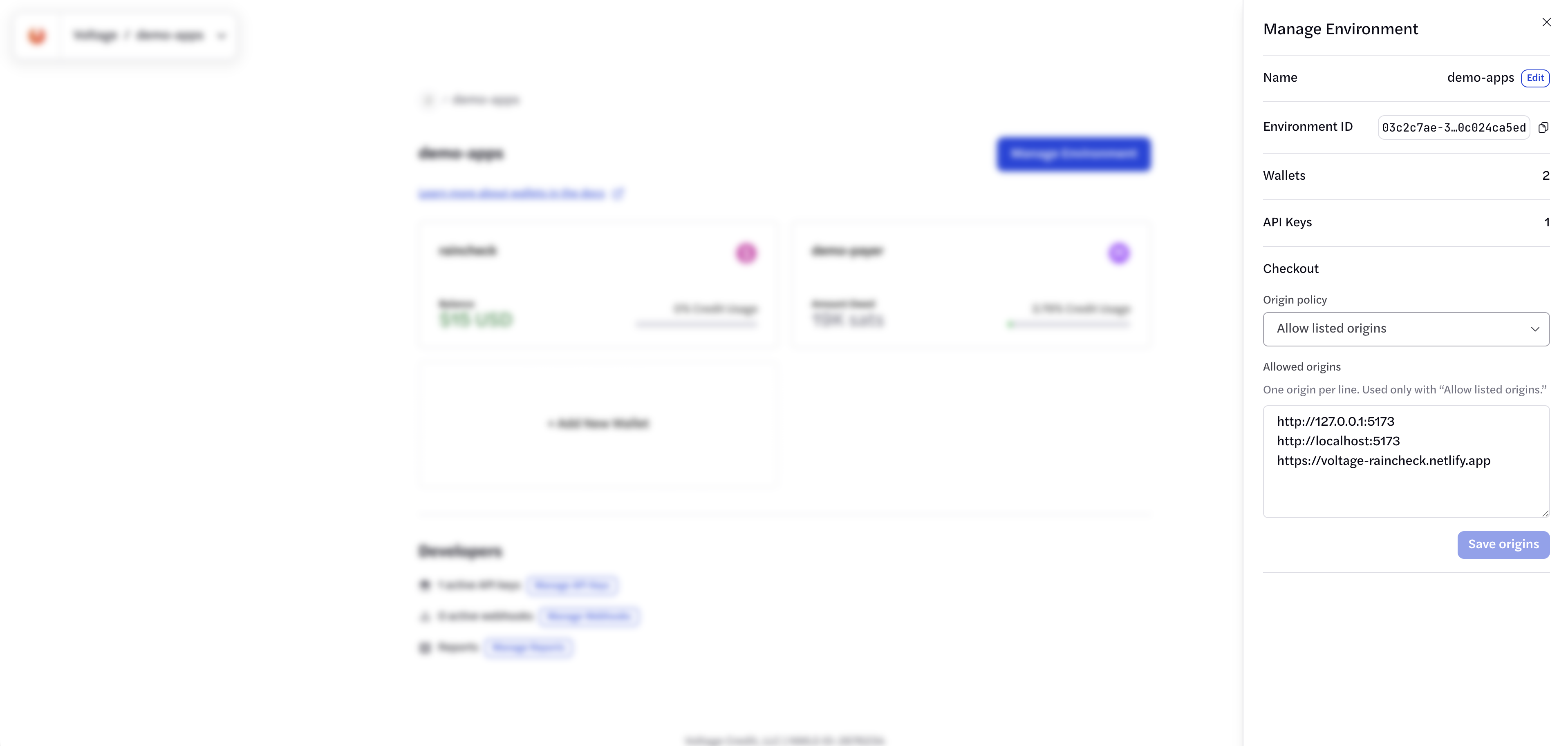
Section titled “Configure browser origins”First, decide which browser origins you want to allow when using the Checkout in an iframe or SDK overlay. A full-page redirect does not embed Checkout, so it does not need an origin entry. For example, you could declare that you only want the Checkout to be shown on shop.example.com, as well as staging.shop.example.com for testing and localhost:5173 for local development. You can also allow your Checkout to appear on any domain name, though this is not recommended. If you choose “Deny”, no site can embed Checkout in an iframe or SDK overlay for that environment. Deny does not disable full-page hosted checkout, and it does not revoke checkout links that have already been created.
To configure browser origins:
- Sign in to Voltage.
- Open the organization and environment.
- Select Manage Environment.
- Find Checkout.
- Select an origin policy.
- If you use an allowlist, enter one exact origin per line.
- Save the origins.
Formatting the origin
Section titled “Formatting the origin”An origin contains a scheme, hostname, and optional port. It does not contain a path, query, user information, or fragment.
Valid origins:
https://shop.example.comhttps://admin.example.com:8443http://localhost:5173http://127.0.0.1:5173Invalid origins:
shop.example.comhttps://shop.example.com/checkouthttps://shop.example.com?store=1https://*.example.com| Policy | Behavior | Recommended use |
|---|---|---|
| deny_all | Prevents iframe and SDK embedding. Full-page hosted checkout still works. | Environments that use only full-page redirects, or that should never be embedded. |
| allowlist | Permits only exact entries in allowed_origins. | Live use and normal testing. |
| allow_all | Permits any browser origin. | Short-lived troubleshooting only. |
localhost and 127.0.0.1 are different origins. Netlify, Vercel, and similar deploy previews also have origins that differ from the primary site. Add each origin intentionally, and review the list before launch. Browser-origin settings are specific to each environment. When switching environments, re-add your application’s exact origin in the new environment—for example, https://voltage-raincheck.netlify.app. This is separate from the API key’s IP allowlist.
Create a checkout session
Section titled “Create a checkout session”Create a checkout session from your server. Never call this endpoint from browser code, because the request carries your API key.
POST https://voltageapi.com/v1/organizations/{organization_id}/environments/{environment_id}/checkout/sessionsx-api-key: {api_key}Content-Type: application/jsonExample request
Section titled “Example request”This request creates a 10,000-satoshi Lightning (BOLT11) checkout with optional return URLs:
curl -X POST "https://voltageapi.com/v1/organizations/$VOLTAGE_ORGANIZATION_ID/environments/$VOLTAGE_ENVIRONMENT_ID/checkout/sessions" \ -H "x-api-key: $VOLTAGE_API_KEY" \ -H "Content-Type: application/json" \ -d '{ "id": "NEW_SESSION_UUID", "wallet_id": "YOUR_WALLET_ID", "payment_kind": "bolt11", "amount": { "currency": "btc", "amount": 10000000 }, "expires_at": "EXPIRES_AT", "description": "Order 1234", "metadata": { "order_id": "1234" }, "redirect_urls": { "success": "https://shop.example.com/orders/1234/return?outcome=success", "failure": "https://shop.example.com/orders/1234/return?outcome=failure" } }'Before you send it, replace:
NEW_SESSION_UUIDwith a new UUID for this checkout attempt.YOUR_WALLET_IDwith the ID of the wallet that receives the payment.EXPIRES_ATwith a UTC timestamp in the near future, for example 15 minutes from now inYYYY-MM-DDTHH:MM:SSZformat.
The organization, environment, API key and wallet must all belong to the environment you intend to charge. Use a Mutinynet wallet environment during development, and switch to your live environment and mainnet wallet when you are ready to accept real payments.
redirect_urls is optional. Include it for a full-page redirect or your own iframe; see Return URLs. The JavaScript SDK does not need it.
Request fields
Section titled “Request fields”| Field | Description |
|---|---|
id | Required · UUID. Merchant-generated session ID. It is also the idempotency key. |
wallet_id | Required · UUID. Wallet that receives the payment. |
payment_kind | Required · string. Use bolt11 for the beta checkout flow. The API also accepts onchain, bip21 and taprootasset. onchain and bip21 must be enabled for your organization. |
amount | Conditional · object. Fixed amount: { "currency": ..., "amount": ... }. See Amount encoding. Required for USD, onchain and taprootasset. Omit it only for an any-amount bolt11 or bip21 session, where the customer chooses the amount. Any-amount sessions require a BTC-backed wallet. |
expires_at | Required · string. RFC 3339 UTC timestamp. Must be in the future and no more than 24 hours away. |
currency | Optional · string. btc, usd or asset:<group key>. If you send amount, it must match amount.currency. When amount is omitted, it defaults to btc. |
payment_id | Optional · UUID. Merchant-generated payment ID. Must be unique. Voltage generates one when omitted. Payment webhooks return it as detail.data.id. |
description | Optional · string. Payment description. For bolt11, Voltage uses it as the invoice memo. |
payment_metadata | Optional · object. String keys and string values copied onto the payment. Up to 50 entries, 256 characters per key and value. Voltage adds checkout_session_id itself, so you can’t use that key. |
metadata | Optional · object. Any JSON object, stored with the checkout session. It is not copied onto the payment. Defaults to {}. |
redirect_urls | Optional · object. Where Continue sends the customer when the session ends. |
redirect_urls.success | Optional · string. Absolute http or https URL for a completed payment. |
redirect_urls.failure | Optional · string. Absolute http or https URL for a failed payment or expired session. |
If you send redirect_urls, include at least one of success or failure. Unknown fields inside redirect_urls are rejected.
The session id is the idempotency key. Resending an identical request with the same id returns the same session, so you can retry safely after a network error. Reusing the id with any field changed returns 409 Conflict.
Amount encoding
Section titled “Amount encoding”amount.amount is an integer in the currency’s smallest unit:
| Currency | Unit | Example |
|---|---|---|
btc | Millisatoshis (1 satoshi = 1,000 msats) | 10,000 satoshis: { "currency": "btc", "amount": 10000000 } |
usd | Cents | $25.00: { "currency": "usd", "amount": 2500 } |
asset:<group key> | The asset’s base units | { "currency": "asset:<66-character hex group key>", "amount": 100 } |
A fixed BTC amount must be at least 1 satoshi (1,000 msats). Do not send decimal BTC values. USD amounts require a wallet with a USD-backed line of credit.
bolt11, onchain and bip21 accept only btc or usd amounts. taprootasset requires a fixed, non-zero asset amount and does not work with a USD-backed wallet.
Successful response
Section titled “Successful response”A successful request returns 201 Created:
{ "id": "11111111-1111-4111-8111-111111111111", "payment_id": "22222222-2222-4222-8222-222222222222", "checkout_token": "vlt_co_REDACTED", "checkout_url": "https://app.voltage.cloud/cs/11111111-1111-4111-8111-111111111111#vlt_co_REDACTED", "expires_at": "2026-10-21T18:15:00Z", "origin_policy": "allowlist", "allowed_origins": ["https://shop.example.com"]}| Field | Description |
|---|---|
id | Checkout session ID. Store it with your order. |
payment_id | Payment ID. Store it with your order and use it to verify payment. |
checkout_token | Bearer credential for the hosted page. It is already part of checkout_url. |
checkout_url | Complete hosted checkout URL. Send this to the browser. |
expires_at | When the session expires. |
origin_policy | The environment’s browser-origin policy: deny_all, allowlist or allow_all. |
allowed_origins | The environment’s allowed origins, used when the policy is allowlist. |
Use checkout_url exactly as returned. The URL fragment contains a bearer credential. Do not log it, send it to analytics or error tracking, include it in screenshots, or move it into a query parameter.
Choose how to open Checkout
Section titled “Choose how to open Checkout”All three options use the same server-created session and the same checkout_url. They differ in where the hosted page runs and how the customer gets back to your site.
| Option | Where the hosted page runs | How the customer returns | Origin allowlist |
|---|---|---|---|
| JavaScript SDK (recommended) | Overlay iframe created by the SDK | SDK callbacks (onComplete, onClose, …) | Required |
| Full-page redirect | The whole browser tab | Continue button to your redirect_urls | Not used |
| Your own iframe | An iframe on your page | Continue loads your return page inside the iframe | Required |
The redirect and iframe options don’t load checkout.js. They rely on return URLs, which you set when you create the session.
Open Checkout with the JavaScript SDK
Section titled “Open Checkout with the JavaScript SDK”Load the Checkout SDK:
<script src="https://app.voltage.cloud/checkout/v1/checkout.js"></script>Your browser should call your own server endpoint, receive the complete checkout URL, and pass it to the SDK:
async function startCheckout(productId) {  const response = await fetch('/api/checkout', {    method: 'POST',    headers: { 'content-type': 'application/json' },    body: JSON.stringify({ product_id: productId })  });
  const checkout = await response.json();  if (!response.ok) {    throw new Error(checkout.error || 'Unable to create checkout session.');  }
  let instance;  instance = window.VoltageCheckout.open({    checkoutUrl: checkout.checkout_url,    theme: 'dark',    dismissible: true,    title: 'Pay Example Store',    amountDisplay: {      primary: 'requested_amount',      secondary: 'auto',      bitcoinUnit: 'sats',      locale: 'en-US',      currencyDisplay: 'code'    },    onComplete(payload) {      // This is a UI signal. Verification still happens on the server.      instance.close();      showOrderPendingVerification(payload.session_id);    },    onExpired() {      showCheckoutExpired();    },    onFailed() {      showCheckoutFailed();    },    onCancel() {      showCheckoutCancelled();    },    onClose() {      restoreMerchantPage();    }  });}
The SDK creates and sizes the iframe, validates message origins, locks page scrolling, restores focus, and removes the overlay when closed. If you cannot load the SDK, use a full-page redirect or your own iframe instead.
SDK options
Section titled “SDK options”| Option | Description |
|---|---|
| checkoutUrl | Complete checkout_url returned by Voltage. Required. |
| theme | light or dark. |
| dismissible | When false, hides customer dismissal controls. Merchant code can still call close(). |
| title | Accessible iframe title. Describe the payment task. |
| amountDisplay.primary | amount, requested_amount, or custom display text. |
| amountDisplay.secondary | auto, hidden, or custom display text. |
| amountDisplay.bitcoinUnit | auto, btc, or sats. |
| amountDisplay.locale | BCP 47 locale such as en-US. |
| amountDisplay.currencyDisplay | symbol or code. |
| onComplete | Checkout reported a completed payment. Verify it on your server. |
| onExpired | Session expired before completion. |
| onFailed | Checkout reported a failed payment. |
| onCancel | Checkout reported an explicit cancellation event. |
| onMessage | Receives every accepted Voltage checkout message. |
| onClose | Runs after the SDK removes the overlay. |
open() returns an object with:
- close() — removes the overlay programmatically.
- iframe — the iframe element created by the SDK.
Terminal callbacks do not automatically remove the overlay. This lets the hosted page display its completed, failed, or expired state. Call close() when your merchant experience should continue elsewhere.
An ordinary customer dismissal runs onClose; it does not imply payment failure or cancellation. Before creating another payment, check the original order on your server.
Example completion payload
Section titled “Example completion payload”Terminal callback payloads can include the session and amount details:
{ "status": "completed", "session_id": "11111111-1111-4111-8111-111111111111", "amount": { "currency": "btc", "amount": 10000000, "unit": "msats" }, "btc_amount": { "currency": "btc", "amount": 10000000, "unit": "msats" }}Use session_id to update the customer interface, then verify the corresponding payment from trusted server code.
Return URLs
Section titled “Return URLs”Add redirect_urls to the create checkout session request to give the hosted page somewhere to send the customer when checkout ends:
{ "redirect_urls": { "success": "https://shop.example.com/orders/1234/return?outcome=success", "failure": "https://shop.example.com/orders/1234/return?outcome=failure" }}| Field | Description |
|---|---|
redirect_urls.success | Shown when the payment is completed. |
redirect_urls.failure | Shown when the payment is failed or the session is expired. |
- Include at least one of
successorfailure. Each must be an absolutehttporhttpsURL. Other fields are rejected. - There is no cancel URL. If the customer leaves before paying, they don’t reach either URL.
- Checkout does not redirect automatically. When the session ends, the hosted page shows a Continue button that opens the matching URL. If no URL is set for that outcome, there’s no Continue button.
- Return URLs are part of the session’s immutable inputs. If you retry a session creation with the same
id, send the sameredirect_urls. - Put your own order reference in the URL. Never put the checkout token,
checkout_url, or an API key in it.
Redirect to the hosted page
Section titled “Redirect to the hosted page”With a full-page redirect, the customer leaves your site to pay on the hosted page, then selects Continue to come back.
- Your server creates the session with
redirect_urls. - Your browser sends the customer to the complete
checkout_url. - The customer pays on the hosted page.
- When the session ends, the customer selects Continue and arrives at your return URL.
- Your return page shows the order status that your server has verified.
Include redirect_urls in the session request, as shown in the example.
Then, in the browser, send the customer to the URL exactly as your server returned it:
async function startCheckout(productId) {  const response = await fetch('/api/checkout', {    method: 'POST',    headers: { 'content-type': 'application/json' },    body: JSON.stringify({ product_id: productId })  });  const checkout = await response.json();  if (!response.ok) {    throw new Error(checkout.error || 'Unable to create checkout session.');  }
  window.location.assign(checkout.checkout_url);}
While the payment is in progress, the hosted page asks the browser to confirm before the customer leaves, but browsers may skip that prompt. If the browser has a previous page to go back to, the hosted page also shows a Back button. Your return page should handle a customer who comes back without paying. Show the order’s current state from your server, and check the existing payment before you create another session.
Embed the hosted page in your own iframe
Section titled “Embed the hosted page in your own iframe”You can show the hosted page in an iframe on your own page without the SDK. In this case, Continue loads your return URL inside the iframe, not in the whole tab. Your return page is responsible for telling your page that checkout is finished.
- Add your page’s exact origin to the environment’s origin allowlist. Without it, the browser won’t show Checkout in your iframe.
- Create the session with
redirect_urlsthat point to a return page on the same origin as the page that contains the iframe. - Set the iframe
srcto the completecheckout_url. - When the session ends, the customer selects Continue. The iframe loads your return page.
- Your return page sends a message to the parent page. The parent checks it, removes the iframe, and asks your server for the verified order status.
The page that contains the iframe:
<iframe id="voltage-checkout" title="Pay with Voltage Checkout"  allow="clipboard-write"></iframe><script>  // checkout: the response from your server.  // attemptId: a random ID that you also put in the return URLs.  function openCheckout(checkout, attemptId) {    const frame = document.getElementById('voltage-checkout');
    function onMessage(event) {      if (event.origin !== window.location.origin) return;      if (event.source !== frame.contentWindow) return;      const data = event.data;      if (data?.type !== 'shop.checkout-return' || data.attempt !== attemptId) return;
      window.removeEventListener('message', onMessage);      frame.remove();      showOrderStatusFromServer(); // Verify on the server before fulfillment.    }
    window.addEventListener('message', onMessage);    frame.src = checkout.checkout_url;  }</script>
Your return page, for example https://shop.example.com/checkout-return?attempt=…&outcome=success:
<!doctype html><p>Returning to the store…</p><script> const params = new URLSearchParams(window.location.search); if (window.parent !== window) { const message = { type: 'shop.checkout-return', attempt: params.get('attempt'), outcome: params.get('outcome') }; window.parent.postMessage(message, window.location.origin); }</script>- Allow framing of the return page by your own origin only. Use
X-Frame-Options: SAMEORIGINorContent-Security-Policy: frame-ancestors 'self'. A site-wideDENYblocks the return page from loading inside the iframe. - Check every message. Accept a message only when its
originis your own origin, itssourceis the checkout iframe, and itsattemptmatches the checkout you opened. - Target your own origin in
postMessage, not*. - Treat
outcomeas a hint. It decides what to show while your server checks the payment. It doesn’t decide whether the order is paid.
For a working example, see the Raincheck demo.
Verify payment on your server
Section titled “Verify payment on your server”Store the checkout session ID and payment ID with your merchant order. Before fulfillment, either process a trusted Voltage webhook or retrieve the payment from the Payments API:
GET https://voltageapi.com/v1/organizations/{organization_id}/environments/{environment_id}/payments/{payment_id}Authenticate from your server. Fulfill only after the authoritative payment state is complete, and make fulfillment idempotent so retries or duplicate webhook delivery cannot produce a second order.
See Webhooks and the Voltage Payments API for the complete verification contract.
Payment lifecycle
Section titled “Payment lifecycle”| Status | Meaning |
|---|---|
| generating | Voltage is creating the payment request. |
| receiving | The request is ready and Voltage is waiting for payment. |
| completed | Voltage completed the receive payment. |
| failed | Voltage could not complete the payment. |
| expired | The session reached expires_at before completion. |
Browser dismissal is not a payment status. A customer may close or refresh the page while payment is still in flight.
Give customers a merchant-controlled order-status page. If a session is interrupted, verify the existing payment before creating another checkout. If you retry session creation after an uncertain network response, reuse the original session ID and immutable inputs first.
Security checklist
Section titled “Security checklist”- Keep the environment API key on your server.
- Never use a VITE_, NEXT_PUBLIC_, or similar public prefix for the API key.
- Create checkout sessions through a merchant-controlled server endpoint.
- Use the complete returned checkout URL without reconstructing it.
- Treat the checkout token and checkout URL as bearer credentials.
- Redact tokens and URLs from logs, analytics, screenshots, and support tickets.
- Use an exact origin allowlist for every live browser origin.
- Treat browser callbacks as UI signals only.
- Verify payment on the server before fulfillment.
- Make order fulfillment idempotent.
Troubleshooting
Section titled “Troubleshooting”| Symptom | Likely cause | What to check |
|---|---|---|
| 401 Unauthorized creating a session | Missing or invalid API key. | x-api-key, API environment, and secret loading. |
| 403 Forbidden creating a session | API key lacks access. | Organization, environment, and key permissions. |
| 409 Conflict creating a session | Session ID reused with different inputs. | Replay the original request or generate a new UUID. |
| Browser says the checkout refused to connect | Origin blocked by checkout framing policy. | Exact scheme, hostname, port, and environment settings. |
| Checkout says its token is missing | URL fragment was removed. | Pass the complete returned checkout_url unchanged. |
| SDK does not load | Wrong script URL, CSP, network, or script failure. | SDK URL and browser console. |
| Checkout remains in generating | Payment creation or status updates are delayed. | Payment and session records in Voltage. |
| Checkout completes but merchant UI does not update | Callback or origin-message problem. | Parent origin, SDK version, callback handlers, and console. |
| Checkout returns a plain-text 5xx | Hosted checkout or upstream service is unavailable. | Record the time and IDs, avoid logging the token, and contact support. |